Please wait
  • Products
    ⏱️
    Time Tracking

    Automated logs & billables.

    📂
    Document Management

    Secure vault for all files.

    🔄
    Workflow Management

    Automate repetitive tasks.

    💳
    Invoicing & Finance

    Proposals to payments.

    👥
    Team Management

    Resource & capacity planning.

    📋
    Audit Trails

    Full transparency & compliance.

  • Resources
    ✍️
    Blog

    Insights on scaling your consultancy.

    🧮
    Calculators

    Overtime, currency, utilization, and more

    🎬
    How-to Videos

    Master the platform in minutes.

  • Pricing
  • Login
  • Register
  • FREE TOOL
TimeCatchApp
⏱️
Time Tracking

Automated logs & billables.

📂
Document Management

Secure vault for all files.

💳
Invoicing & Finance

Proposals to payments.

👥
Team Management

Resource & capacity planning.

📋
Audit Trails

Full transparency & compliance.

✍️
Blog

Insights on scaling your consultancy.

🧮
Calculators

Overtime, currency, utilization, and more

🎬
How-to Videos

Master the platform in minutes.

Pricing Login Register
FREE TOOL
Core Solution

Invoicing and Project Finance Software

From Billable Minute to Paid Invoice in Three Clicks

For the independent consultant or small agency, invoicing is often a dreaded manual chore—copying data from spreadsheets, double-checking dates, and hoping nothing was missed. TimeCatchApp transforms project finance from a reactive headache into a proactive strategic advantage.

Solo consultants can lose up to 12% of their billable revenue simply because they forget to log small tasks or fail to follow up on aging invoices. TimeCatchApp’s integrated finance capability plugs those holes, ensuring that when you work, you get paid—accurately, professionally, and on time.

Try It Free Quick Start Videos
>
  • ✓Eliminate Revenue Leakage
  • ✓Automated Documentation & Compliance
  • ✓Real-Time Financial Clarity
Project list and task list with dependencies
People-first overview

Why You Need Integrated Invoicing and Financial Reports

Zero-Gap Billing

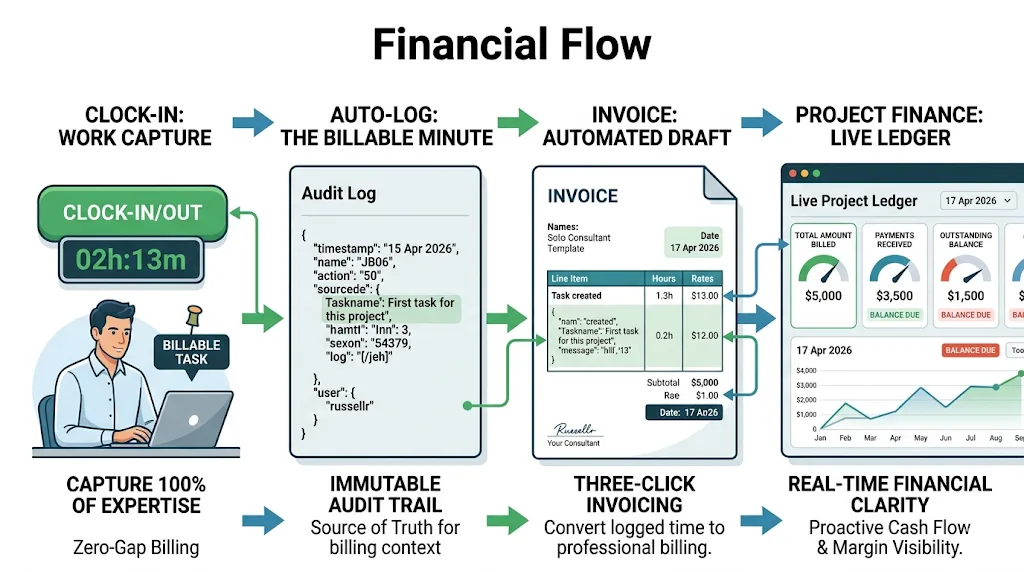
In a disconnected system, small tasks often go unbilled because the friction of adding them to an invoice is too high. In TimeCatchApp, every "Clock Out" is a potential line item.

The Benefit: Capture 100% of your billable effort. The system automatically flows completed activities into your next invoice, ensuring you are paid for every minute of expertise.
Real-Time Financial Clarity

Most consultants don't know their actual project margin until weeks after the work is done. TimeCatchApp provides a Live Project Ledger.

The Benefit: Instantly see "Amount Billed" vs. "Payments Received" and "Outstanding Balance" for every client. You’ll never be surprised by a project that is over-budget or an invoice that is long overdue.

Professionalism at Scale

Your invoice is often the last touchpoint in a client's experience. A professional, integrated invoice template signals that your small organization has enterprise-grade systems.

The Benefit: Build client trust with clear, itemized, and accurate billing that mirrors the audit logs and project tasks they’ve already seen.

Automated Documentation & Compliance

Because invoices are stored directly within the Project Context, your financial records are always exactly where they should be: attached to the project they belong to. And always available, with activity information, project finances, and expense receipts.

The Benefit: Tax season and financial audits become trivial. Your "Source of Truth" for time, documents, and money is unified in one secure vault.

Definition

What Integrated Invoicing Software and Financial Reports Can Do For You

For a solo consultant or small firm, integrated invoicing software eliminates "admin Sunday" and the end of billable leakage. When your project finances are integrated directly with your time tracking software, you stop being a part-time bookkeeper and start being a full-time expert. And with the integrated project finance software that produces a real-time project ledger, you always know where your project is.

Process of using integrated invoicing
LinkingFed by time tracker
CompleteEvery delivery is billed
TrackFinance visible
One SystemOne source of truth
FlexAdjusts as project evolves
Use case

How Professionals Use Integrated Invoicing Software and Financial Reporting

For a small consulting firm or solo practice, the "financial friction" of manual billing and opaque project health can lead to significant revenue leakage and lost administrative hours. Integrated invoicing software and financial reporting transforms these financial tasks from a burden into a proactive strategy.

Use Case: The "Mid-Project Financial Pulse Check"

The Scenario: A three-person consultancy is halfway through a $15,000 "Operational Efficiency Audit" for a client. The team consists of a Lead Consultant, a Senior Associate, and a Junior Analyst.

1. Automated Line-Item Generation (Saving Time)

Throughout the week, the team clocks in and out of specific tasks. Because TimeCatchApp is integrated, the Lead Consultant doesn't have to "re-create" the work week on Friday. They click "Generate Invoice," and the system automatically pulls every billable minute, categorized by the consultant's specific rate, directly into a draft.

The Benefit: Reduces "Admin Sunday" from 4 hours of manual data entry to 10 minutes of review. It ensures 100% Billing Accuracy by capturing small 15-minute tasks that usually fall through the cracks of a manual spreadsheet.

2. Live Project Ledger (Financial Oversight)

Before sending the next invoice, the Lead Consultant opens the Live Project Ledger. They see that while $7,500 has been billed to date, the "Payments Received" column shows only $3,000.

The Benefit: The system highlights that $4,500 is currently outstanding. This "Financial Pulse Check" allows the Lead to address the overdue balance with the client before they commit another 40 hours of team labor to the next phase.

3. Budget vs. Actual Monitoring (Saving Money)

The Lead notices that the "Junior Analyst" role has already consumed 70% of its allocated budget, but the task is only 40% complete.

The Benefit: Because the financial reporting is tied to the live time-tracker, the Lead identifies the budget overrun in real-time. They can pivot the team’s strategy immediately, preventing a project that looks "busy" from becoming a project that is "unprofitable."

4. Professional Accountability & "Dispute-Free" Billing

The client asks for a breakdown of the Senior Associate's hours. Instead of a defensive email, the Lead attaches the Immutable Audit Log to the invoice, showing the specific timestamps and documents the Associate worked on.

The Benefit: This level of transparency effectively eliminates billing disputes. The client sees the direct link between the fee and the expertise provided, leading to faster payment approvals and a healthier cash flow.

Project Finance Reviews

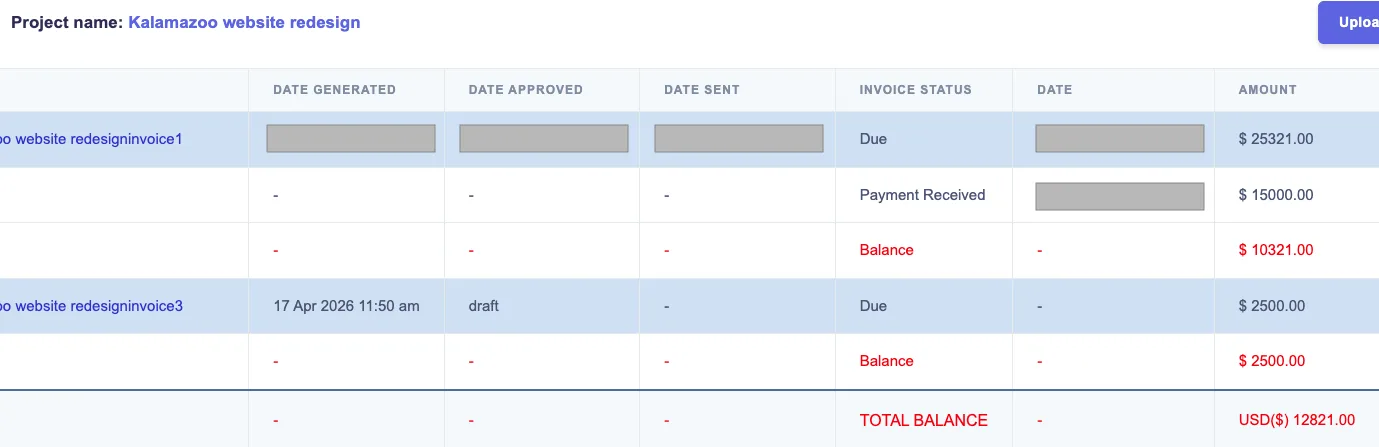
With the integrated invoicing and finance, you can get a quick grasp of the health of your project. In this example, the task Website redesign was completed, and the invoice was generated and set to the client. The client paid $15,000, leaving $10,321 yet to be paid. The due amount is shown in red to catch your attention. Meanwhile, another task was completed, and an invoice of $2,500 has been generated. It is still in draft mode, not yet sent to the client. This leaves us a total amount due of $12,821.

Project finance report integrating with billing
Hands-free Invoicing

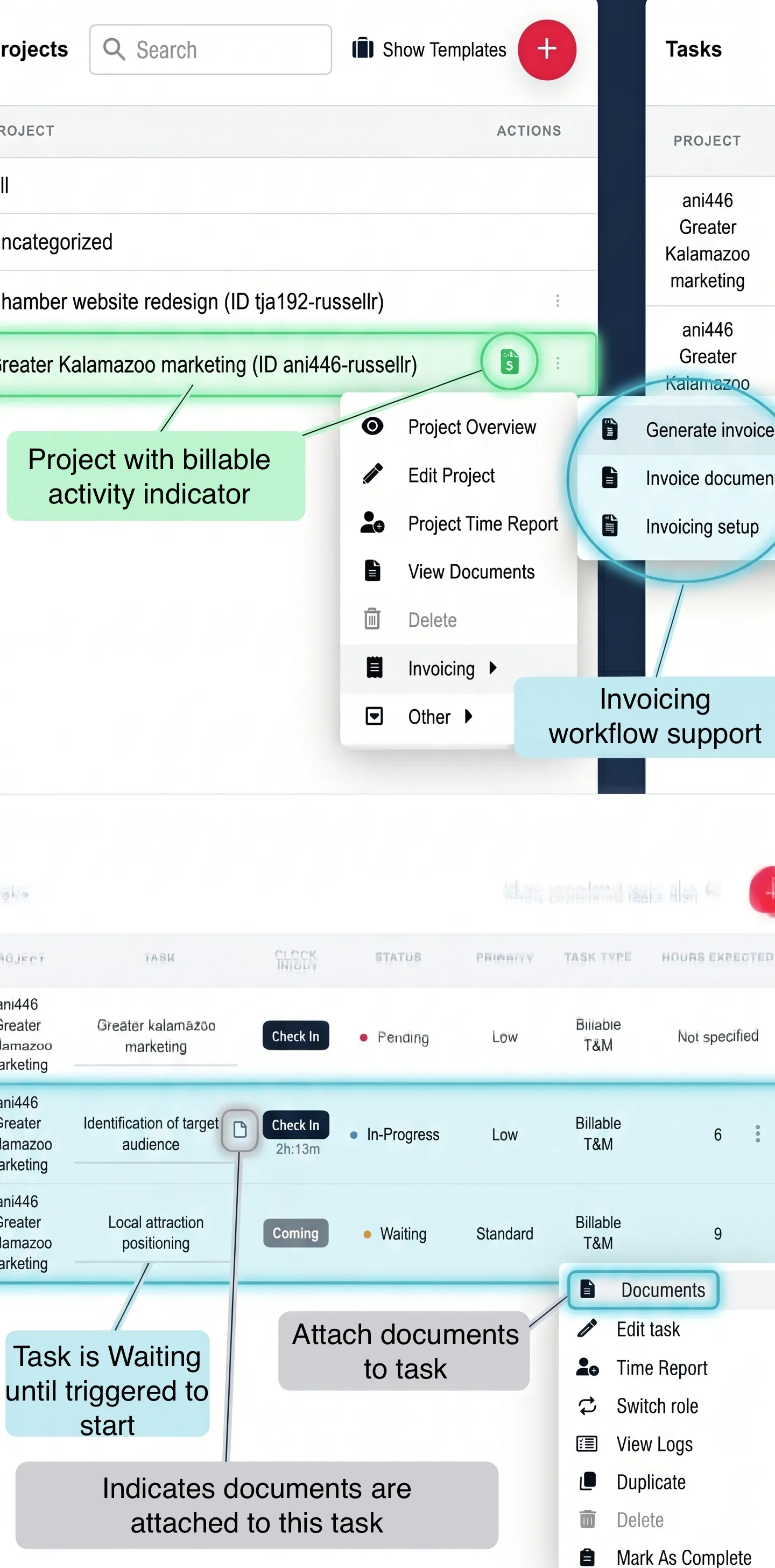
Whether the work is T & M or deliverables, based, the system tracks all invoiceable activities. When you generate an invoice these activities will show up on the draft invoice, which you can then review. Activities and time slices that are on previous invoices will not show up new invoices, since each activity is tracked to its invoice. There is no guessing, no need to review old records, no forgetting what was done this month or this invoicing period versus last.

Indicator for project with invoiceable activity
Invoice Aging

Do you always know what your client owes you? Have you lost revenue because you did not know what you were owed at any given time? Is this something you can look up in a few seconds? TimeCatchApp gives you complete clarity as to what you are owed by each client, for each proect. And it is updated in real-time. Now that you have complete visibility into what you are owed, you can follow up to ensure that you consulting practice is generating the income it should.

Screenshot of templated tasks linked in sequence
Real-time Ledger

Reactive "post-morten" finances: This is a problem with consultants, especially small or solo consultants who do not have a finance staff. Consultants need a solution that shows the financial health of projects at all times, that is easily accessed, and shows the financial position easily, so that proactive actions can be taken.

TimeCatchApp does this!

Screenshot of templated tasks linked in sequence
Automated Invoicing

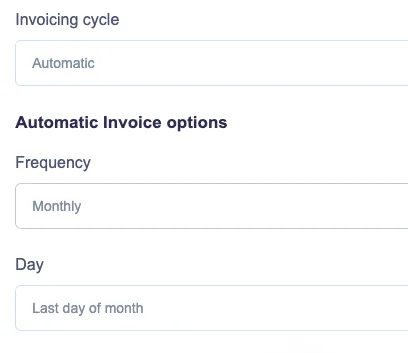
Want your system generating the invoices so that you can concentrate on building your practice? Use TimeCatchApp's autogeneration capability. Periodically, TimeCatchApp will generate an invoice for you! Save time, always invoice when you should.

You will be notified, approved, and send. Automation and control.

Set up your invoices to run themselves

All billable activity, whether time and materials, deliverables, or units, are tracked automatically and will be invoiced at the next invoice date.

Want invoices generated on a schedule? You can do that too!

Feature grid

Core Workflow Software Capabilities

Task organization and prioritization

Structure works around what matters most, not just what appears first. Better prioritization curbs the tendency to react rather than plan, allowing for improved focus.

Start and due date notifications

Support stronger planning with better visibility into when work should begin and when it needs to be completed.

Task-level tracking

See what is moving, what is delayed, and where accountability needs to be reinforced at the task level.

Billable and non-billable visibility

Distinguish between work that supports revenue directly and work that supports delivery behind the scenes.

For teams that want tighter visibility into how work is performed alongside task progress, a dedicated time tracking tool can help connect workflow activity with actual hours spent.

Team communication

Keep more of the work context connected to the work itself so teams can reduce confusion and maintain momentum.

Connected operations

Bring workflow into a broader operating environment that also supports time tracking, documents, and invoicing.

When teams need supporting files, notes, and project materials to stay connected to active tasks, document management software can help keep workflow context more organized and accessible.

For service-based teams, workflow management becomes even more useful when completed work can flow more cleanly into invoicing software that supports billing and financial follow-through.

Helpful content

Helpful Workflow Practices For Professional Teams

Define Responsibilities Early

Clear ownership makes it easier to reduce bottlenecks and keep tasks moving through the right sequence.

Keep Workflows Simple

Overly complicated setups create friction. Start simple, then refine based on how teams actually work.

Build Repeatable Routines

Recurring work becomes easier to manage when the same steps, timing, and responsibilities are visible each time. Even outside software, process-flow improvements have long been associated with productivity gains. NIST’s process flow productivity example offers a useful real-world reference point on how better process design can support efficiency.

Distinguish Between Billable and Non-Billable Work

Both financial awareness and operational visibility can be enhanced by comprehending the nature of the work being executed. Additionally, this invoice automation software guide is available to teams seeking a more comprehensive operational perspective on invoicing efficiency, exceptions, routing, and approvals.

Keep Files Attached To The Work

Tasks become easier to manage when the supporting documents and project context stay connected.

Review Work Before It Stalls

Small delays become bigger delivery problems when bottlenecks are not visible early enough.

Platform information

Workflow Management as Part of a Connected Operating System

For service-based teams, workflow management becomes more valuable when it connects to the rest of the work environment professionals already need. Bringing time tracking, document management, and invoicing into one workflow platform creates a more streamlined system that boosts productivity.

Time Tracking

Track time spent on work projects clearly with the time tracking tool.

Document Management

Ensure that project files, notes, and supporting materials are organized using document management software.

Invoicing

Create a cleaner path from completed work to billing with invoicing software.

Workflow Management

Organize tasks, priorities, accountability, and communication in one workflow management system.

Why it may be a good fit for you

Why Timecatchapp is a Great Solution For Professionals

Consultants, freelancers, and small teams usually do not need heavyweight process software that tend to overcomplicate processes. They need simple workflow management software that is easy to use, clear to manage, and strong enough to support real client work.

That means the right platform should make task flow easier to follow, support priorities and deadlines, improve accountability, fit task-based service delivery, and give teams more visibility into what is happening now.

TimeCatchApp is built around those kinds of needs. That makes it a strong fit for individuals and teams looking for small business workflow management software and workflow task management software without unnecessary complexity. Consultants evaluating how workflow structure, time visibility, and client accountability work together may also find this article on consultant time tracking helpful.

  • ✓Practical for consultants, freelancers, and small teams
  • ✓Supports day-to-day delivery without unnecessary complexity
  • ✓Fits task-based work that needs visibility and accountability
Try It Free
User Testimonial

I've tried several time tracking tools and this one stands out above the rest of them! Their interface is easy to use, as well as advanced technical capabilities like invoicing and document management. This tool helps me get my work done seamlessly and stay organized.

Support content

Resources

Time Tracking Guide

Discover how time tracking helps teams stay organized, improve accountability, and manage work more efficiently.

Learn More

Invoice Software Guide

Learn how invoicing software simplifies billing, supports faster payments, and keeps financial workflows moving.

Learn More

CRM Software Guide

Explore how CRM software strengthens client relationships, centralizes communication, and supports a smoother workflow.

Learn More
FAQ accordion

Still Have Questions? We Have Answers!

What is integrated invoicing software?

Integrated invoicing software links the actions in the practice with the invoices being sent to the clients. It is integrated into the business workflow, in such a way that saves you time, reduces friction, prevents revenue loss.

How does this differ from standard invoice software?

Integration is the key difference. Without integration, you have to manually review your deliverables, add the hours, compute the bill rate, enter the information into the other system, check the data entry, save the file, and THEN send the invoice. And when you are done with this process? You have no system for tracking the payment, reviewing the project health, and taking proactive measures to ensure you get the revenue you earned.

With an integrated invoicing software system like TimeCatchApp, you skip all of those steps. TimeCatchApp does it for you. You save time, you ensure higher quality outputs, and you can track the project financial health easily.

Can I make changes to the project deliverables during the project?

You can in TimeCatchApp. You can add billable deliverables. You can add units. You can add hours. You can change hourly rates at a determined time, possibly in the future. And the system tracks all of this for you.

What if I do not want to bill some time this invoice cycle?

You can just deselect it from the invoice, and that time or deliverable will be put aside for a future invoice.

Does the invoicing software come with prebuilt terms and conditions?

It does. You can use those for your own projects, or you modify or write your own default terms and conditions. Either way, you can also customze each projects terms and conditions as well, including how many days from invoicing until the payment is due. If the payment is not made by the due date, you will be notified by TimeCatchApp so that you can follow up. All to make your life easier, faster, and more productive.

The app works best on Google Chrome, Brave, Firefox, Edge and similar browsers.
You might see problems on Safari. We recommend you switch to a compatible browser from the list above.

Logo
v1.7 (What's new)

TimeCatchApp

  • Time Tracking
  • Project and Document Management
  • Workflow Management
  • Invoicing
  • FAQ
Company
  • Our Team
  • Contact Us
  • Blog
  • LLM Info
Connect With Us

© TimeCatchApp LLC | Data Privacy | Terms of Service

Marketing services by Logo
No Active Clock Found!
Clocked out successfully!
This clock will be discarded due to rounding off rules. Continue?
Clock discarded successfully!